
Community
Share your experience!
Turn on suggestions
Auto-suggest helps you quickly narrow down your search results by suggesting possible matches as you type.
Showing results for
- Community
- Xperia
- XPERIA archive
- Xperia J Android 4.1.2 Jelly Bean firmware Build N...
Options
- Subscribe to RSS Feed
- Mark Topic as New
- Mark Topic as Read
- Float this Topic for Current User
- Bookmark
- Subscribe
- Mute
- Printer Friendly Page
Xperia J Android 4.1.2 Jelly Bean firmware Build Number 11.2.A.0.21 Rolled in INDIA Confirmed, Is it a Global release ?
- Mark as New
- Bookmark
- Subscribe
- Mute
- Subscribe to RSS Feed
- Highlight
- Report Inappropriate Content
March 2013
March 2013
Xperia J Android 4.1.2 Jelly Bean firmware Build Number 11.2.A.0.21 Rolled in INDIA Confirmed, Is it a Global release ?
Xperia J ST26i Android 4.1.2 Jelly Bean firmware Build Number 11.2.A.0.21 Rolled out in INDIA Confirmed, Is it a Global release ?
Have you got this update in your country ????
In INDIA Confirmed 
----------------------------------------------------------------------------------------------------------------------------------------------------------------------------------------------------------------
Xperia J Android 4.1.2 Jelly Bean firmware Build Number 11.2.A.0.21 Details
How to Update Xperia J to Android 4.1.2 Jelly Bean Firmware Buil Number 11.2.A.0.21 - Full Tutorial
SOURCE - http://www.androidgyan.com/2013/03/update-xperia-j-to-android-412-jelly.html
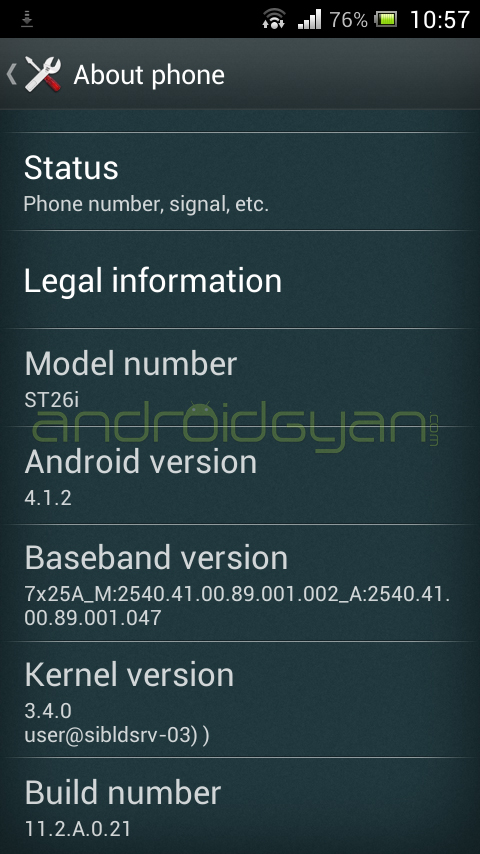
- Phone - Sony Xperia J ST26i (PM-0160-BV).
- Frequency bands supported - GSM: 850/900/1800/1900, UMTS FDD: Band I/Band VIII
- Android Version - Android 4.1.2 Jelly Bean
- Baseband version - 7X25A_M:2540.41.00.89.001.001_A:2540.41.00.89.001.047
- Kernel Version - 3.4.0 user@sibldsrv-03))
- Firmware Build Number - 11.2.A.0.21

Check the image of new notification bar of Xperia J Jelly Bean...

How to Update Xperia J to Android 4.1.2 Jelly Bean Firmware Buil Number 11.2.A.0.21 - Full Tutorial
SOURCE - http://www.androidgyan.com/2013/03/update-xperia-j-to-android-412-jelly.html
via - http://GizmoBolt.com I http://XperiaGuide.com
Message was edited by: AndroidGyan
Message was edited by: AndroidGyan
15 REPLIES 15

- Mark as New
- Bookmark
- Subscribe
- Mute
- Subscribe to RSS Feed
- Highlight
- Report Inappropriate Content
March 2013
March 2013
SI 1267-1213, Three UK Network, received update Friday.
(please click on thumbnails for full size image)
- Mark as New
- Bookmark
- Subscribe
- Mute
- Subscribe to RSS Feed
- Highlight
- Report Inappropriate Content
March 2013
March 2013
Not yet in Romania...
- Mark as New
- Bookmark
- Subscribe
- Mute
- Subscribe to RSS Feed
- Highlight
- Report Inappropriate Content
March 2013
March 2013
Guys i have a problem yesterday i got the new updates of sony xperia j 11.2.A.0.21 i let it to download the updates, it started to install and than when i tryed to power the phone it show me a photo like the updates failed to instal . What can i do ?
I doesn't conect the phone to the computer to do the updates it was downloaded by wifi.
Message was edited by: kosy12
- Mark as New
- Bookmark
- Subscribe
- Mute
- Subscribe to RSS Feed
- Highlight
- Report Inappropriate Content
March 2013
March 2013
Please update again your phone via "PC companion or Sony update services". It may have happened that update file got corrupted, so there is an error. Try via "sony update services" it's better to update your phone via it as you can see the % of update done in it.
- Mark as New
- Bookmark
- Subscribe
- Mute
- Subscribe to RSS Feed
- Highlight
- Report Inappropriate Content
March 2013
March 2013
i cannot open my phone every time i try to open it show me the foto of the download error or kind of
- Mark as New
- Bookmark
- Subscribe
- Mute
- Subscribe to RSS Feed
- Highlight
- Report Inappropriate Content
March 2013
March 2013
I can't understand what error you are actually getting.
You can again update your phone via "Sony update service" as it doesn't require phone to be switched on. start the program and connect your phone in off mode and when it is detected try updating it again.
- Mark as New
- Bookmark
- Subscribe
- Mute
- Subscribe to RSS Feed
- Highlight
- Report Inappropriate Content
March 2013
March 2013
there's the problem doesn't detect my phone when i conect it
- Mark as New
- Bookmark
- Subscribe
- Mute
- Subscribe to RSS Feed
- Highlight
- Report Inappropriate Content
March 2013
March 2013
I can understand, buddy it's better you go to Sony service center and ask then to repair your phone, if it is in warranty. I guess it is the last option left.
- Mark as New
- Bookmark
- Subscribe
- Mute
- Subscribe to RSS Feed
- Highlight
- Report Inappropriate Content
March 2013
March 2013
Ready in Indonesia 

0online
1898450posts