
Community
Share your experience!
Turn on suggestions
Auto-suggest helps you quickly narrow down your search results by suggesting possible matches as you type.
Showing results for
- Community
- Xperia
- Other/General
- Changing my number
Options
- Subscribe to RSS Feed
- Mark Topic as New
- Mark Topic as Read
- Float this Topic for Current User
- Bookmark
- Subscribe
- Mute
- Printer Friendly Page
Changing my number
SOLVED- Mark as New
- Bookmark
- Subscribe
- Mute
- Subscribe to RSS Feed
- Highlight
- Report Inappropriate Content
March 2013
March 2013
I got my Xperia T on contract with Orange (UK). I was given a number but ported my old number over. When I go to my contacts, Myself is shown at the top of the list but it shows the original number assigned to me. Also when I go into settings/about phone/status it shows the original number. Is there any way I can change this? I've tried to edit the "Mysel" contact but it won't let me change that number.
PS Phone on Jellybean 9.1.A.0.489 if it helps
Solved! Go to Solution.
1 ACCEPTED SOLUTION
Accepted Solutions

- Mark as New
- Bookmark
- Subscribe
- Mute
- Subscribe to RSS Feed
- Highlight
- Report Inappropriate Content
April 2013
April 2013
Yes, he can edit the Myself contact but only the information that he added by himself or linked contacts. On some SIM-cards the operator has preprogrammed what number the SIM has (My number). This is the number that is displayed under Settings -> About phone -> Status and under Myself in the phonebook. It's not a linked contact.
I don't think you can edit that number from the phone. My SIM doesn't support My number so i can't test this here but i know it can't be done on our previous Xperia phones.
Having the wrong number as My number shouldn't cause any problem but if you want the correct number to be displayed i would recommend that you contact the operator for assistance.
18 REPLIES 18

- Mark as New
- Bookmark
- Subscribe
- Mute
- Subscribe to RSS Feed
- Highlight
- Report Inappropriate Content
March 2013
March 2013
You should be able to edit the Myself contact, I did mine.
Are you clicking Done after the edit?
- Mark as New
- Bookmark
- Subscribe
- Mute
- Subscribe to RSS Feed
- Highlight
- Report Inappropriate Content
March 2013
March 2013
I can edit the Myself contact but it doesn't show the number I want to change (ie the number assigned to the sim).
- Mark as New
- Bookmark
- Subscribe
- Mute
- Subscribe to RSS Feed
- Highlight
- Report Inappropriate Content
March 2013
March 2013
What does it show then?
Yo could delete the whole contact and then add it again.
- Mark as New
- Bookmark
- Subscribe
- Mute
- Subscribe to RSS Feed
- Highlight
- Report Inappropriate Content
March 2013
March 2013
Hopefully I will be adding screenshots to this post - please bear with me if it doesn't work 
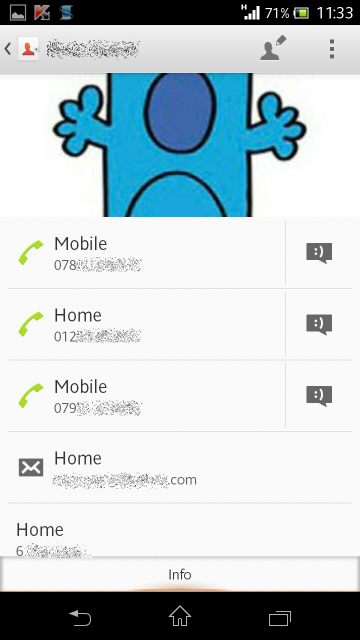
When I go into view this contact it has "mobile" with the number I don't want, and "home" and "mobile" (my correct mobile) along with email address etc. The home and second mobile are ones I have added myself and can be edited.
http://i3.photobucket.com/albums/y83/russ_g_uk/Screenshot_2013-03-25-11-33-18.png
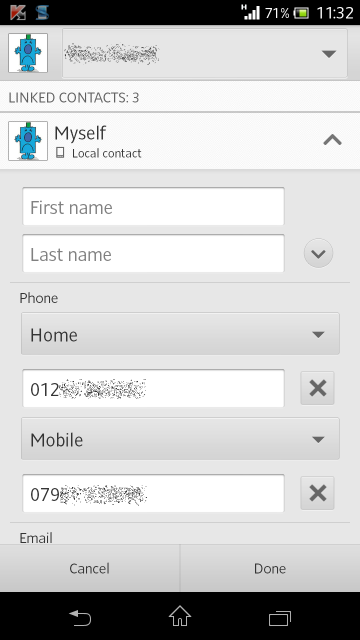
But when in edit, the first mobile number doesn't even appear!
http://i3.photobucket.com/albums/y83/russ_g_uk/Screenshot_2013-03-25-11-32-56.png
I suppose I could delete the contact but that wouldn't change the number as shown in settings/about phone etc would it?
- Mark as New
- Bookmark
- Subscribe
- Mute
- Subscribe to RSS Feed
- Highlight
- Report Inappropriate Content
March 2013
March 2013
So clicking the cross or tapping on the box doesn't do anything?
Don't worry about the settings one, mine eventually changed to unknown number after I done mine.
- Mark as New
- Bookmark
- Subscribe
- Mute
- Subscribe to RSS Feed
- Highlight
- Report Inappropriate Content
March 2013
March 2013
No, when in edit there is no cross to click as the number I don't want doesn't appear. The numbers that have the crosses next to them are the ones I want to keep.
If I delete the "myself" contact, will it appear at the top of the contacts list when I recreate it?
- Mark as New
- Bookmark
- Subscribe
- Mute
- Subscribe to RSS Feed
- Highlight
- Report Inappropriate Content
March 2013
March 2013
On contact info page, press 3 dot menu top right corner, select "set as default".
if the unwanted number is there, select it as defaut then see if it shows on the edit page to be deleted.
- Mark as New
- Bookmark
- Subscribe
- Mute
- Subscribe to RSS Feed
- Highlight
- Report Inappropriate Content
March 2013
March 2013
I've just set it to default but it still doesn't show in the edit page
- Mark as New
- Bookmark
- Subscribe
- Mute
- Subscribe to RSS Feed
- Highlight
- Report Inappropriate Content
March 2013
March 2013
Just seen you have linked contacts to the Myself one.
Don't know if that's right.
Unlink them and keep it seperate and try again.

0online
1904443posts